PC TimeWatch1.12.0.0
Publisher Description
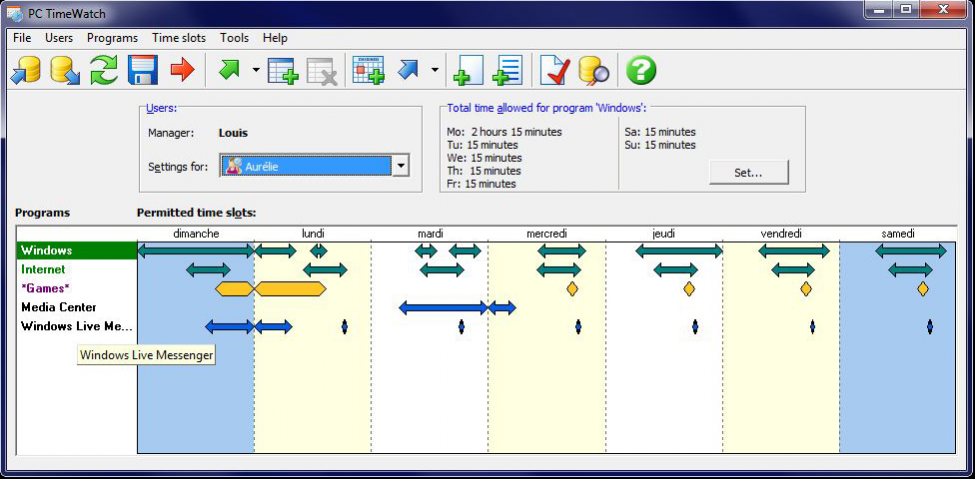
PC TimeWatch manages access to the computer, to the Internet and to programs on the computer. You can define a set of rules for every person who uses the computer. The idea for the utility was inspired by requests from parents wanting to manage childrens' time on the computer. PC TimeWatch allows parents to define rules that should be discussed with their children. Once the rules are accepted by everyone, PC TimeWatch enforces them automatically, thus defusing any conflict between parents and children.
Most similar programs have major security holes, and are easily disabled by anyone with a moderate degree of knowledge about computers. Not PC TimeWatch, which is much safer. And you don't need to be a computer geek in order to use it.
PC TimeWatch was developed in collaboration with the team that created the classic PC Magazine Utilities, and this is reflected in its carefully chosen feature set and very simple, user-friendly interface.
Businesses also find it useful for preventing employees from using their computers to fool around. (Note that PC TimeWatch is not a spy program and does not log activity - it just controls access.) The program's access management settings are very flexible so PC TimeWatch can be adapted to many types of uses.
About PC TimeWatch
This Access Control program is available in English, French, German, Italian, Portuguese, Spanish. It was last updated on 29 September, 2026. PC TimeWatch is compatible with the following operating systems: Other, Windows.
The company that develops PC TimeWatch is PLJ Soft. The latest version released by its developer is 1.12.0.0. This version was rated by 4 users of our site and has an average rating of 3.3.
The download we have available for PC TimeWatch has a file size of 18.9 MB. Just click the green Download button above to start the downloading process. The program is listed on our website since 2017-06-10 and was downloaded 328 times. We have already checked if the download link is safe, however for your own protection we recommend that you scan the downloaded software with your antivirus. Your antivirus may detect the PC TimeWatch as malware if the download link is broken.
How to install PC TimeWatch on your Windows device:
- Click on the Download button on our website. This will start the download from the website of the developer.
- Once the PC TimeWatch is downloaded click on it to start the setup process (assuming you are on a desktop computer).
- When the installation is finished you should be able to see and run the program.
Program Details
General
System requirements
Download information
Pricing
Version History
version 1.12.0.0
posted on 2017-06-10
Full spanish interface and documentation
version 1.4.6.1
posted on 2006-10-14
Windows Vista compatible version
